Mastering Back Button Focus: Why It Will Improve Your Photography
If you’re looking to take your photography skills to the next level, learning how to use back button focus is a game-changer. It’s a simple camera setting that can help you achieve sharper images in various challenging situations, such as night photography, sports, portraits, and still life shots.
In this article, I’ll explain what back button focus is, why it’s beneficial, and how you can set it up on your camera.
What is Back Button Focus?
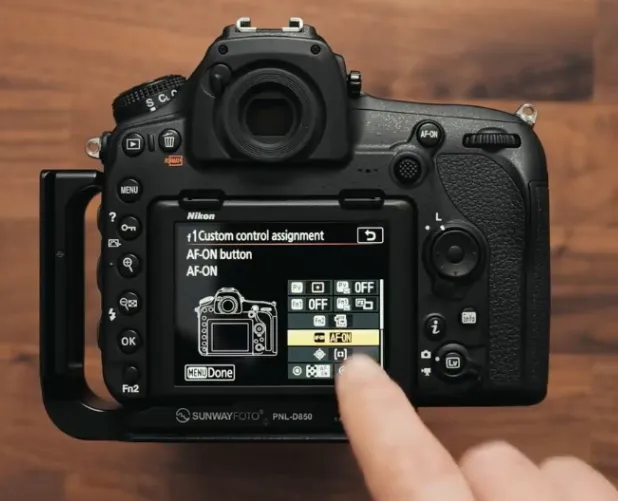
Back button focus is a customization feature that separates the focus function from the shutter button on your camera. Normally, the shutter button is used to both focus and take the shot, but with back button focus, a button on the back of the camera is assigned to autofocus. The shutter button is then left to simply capture the image.
This setup provides you with more control over your camera’s focus system, especially in tricky shooting situations. Let’s take a look at why this setup can help you.
Why Use Back Button Focus?
You may be wondering, “Why should I bother with this?” Here are two main reasons why back button focus is incredibly useful.
1. Photographing Fast-Moving Subjects
When photographing fast-moving subjects like pets, children, or sports scenes, you need a focus system that can track and maintain focus while you shoot. Normally, when using the shutter button for both focus and capture, the camera stops focusing once you press the button all the way down. This means that as your subject moves, it can quickly fall out of focus.
With back button focus, the focus continues to track as long as your thumb is pressing the back button. The shutter button only captures the image, allowing both actions to happen simultaneously. This significantly improves your success rate with fast-moving subjects, especially if you’re also using continuous or high-speed shooting modes.
2. Shooting Stationary Subjects
When photographing still subjects, such as portraits or still life, you might be familiar with the “focus and recompose” method. This is where you lock focus on a subject by pressing the shutter halfway down, then reframe your shot before fully pressing the button to take the photo. This method can be cumbersome when you need to recompose multiple times.
With back button focus, once you focus on the subject using the back button, the focus stays locked until you press the button again. This allows you to freely adjust your composition without worrying about the focus shifting. This is particularly helpful in situations like night photography or when doing light painting, where you want to lock focus on your subject without it changing as you reframe your shot.
Potential Drawbacks of Back Button Focus
While back button focus offers numerous advantages, there are two potential drawbacks to consider.
1. Forgetting to Focus
When you’re new to back button focus, you may occasionally forget to press the back button, resulting in out-of-focus images. To overcome this, practice using the back button in various shooting scenarios, so it becomes second nature. Start by photographing less critical subjects like flowers in your garden, or take a walk and practice until you feel comfortable.
2. Handing Your Camera to Someone Else
If you need to hand your camera to someone else to take a photo, back button focus can be confusing for them. Unless the person is familiar with back button focus, it’s best to disable it temporarily and revert to the default settings so they can focus using the shutter button. This is especially important when handing the camera to someone who isn’t a photographer. It’s much easier for them to understand the usual setup, and you won’t end up with a bunch of out-of-focus photos.
How to Set Up Back Button Focus on Your Camera
The process of setting up back button focus varies by camera brand and model, so it’s essential to check your camera’s manual for specific instructions. However, I’ll give you a quick overview of how to set it up for different camera brands:
- Canon: To set up back button focus on a Canon DSLR, go into the custom function menu, find the setting for “Shutter/AF button,” and assign it to the back button (usually the AF-ON button).
- Nikon: On Nikon DSLRs, go into the custom settings menu, select the autofocus settings, and assign autofocus to the back button (usually the AF-ON button).
- Sony: For Sony Alpha cameras, go to the custom button settings, find the autofocus settings, and assign it to a button like the AEL button. You may also need to set the camera to continuous autofocus for best results.
- Fujifilm: Fujifilm cameras make it easy by default. Switch the focus mode to manual, and the back button becomes the autofocus button automatically. If needed, you can adjust settings for continuous autofocus as well.
If you’re unsure how to do this on your camera, YouTube is an excellent resource for specific tutorials for your model. Just search for “[camera model] back button focus setup” to find detailed guides.
Conclusion
Back button focus is a powerful technique that can help you achieve sharper, more consistent images, especially in challenging situations like fast-moving subjects or low-light conditions. While it might take some time to get used to, the benefits are undeniable once you get the hang of it.
By allowing you to separate focus and capture functions, this setup gives you more control over your camera, making it easier to track subjects and lock focus while composing your shots. Give it a try, and soon you’ll wonder how you ever lived without it.