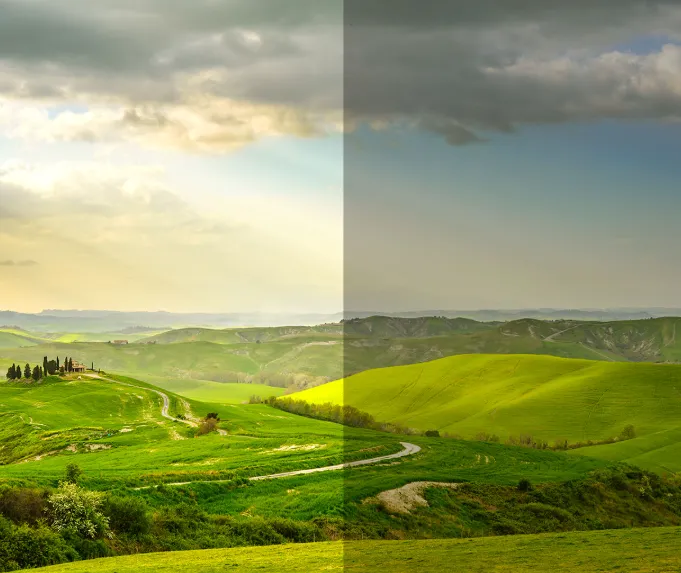
What Is Exposure Compensation and How to Use It Effectively
Exposure compensation is an essential tool in photography that allows you to adjust the exposure of your photos, giving you more control over how light or dark your images appear. Understanding how and when to use this feature can significantly improve your ability to capture images exactly as you envision them.
What is Exposure Compensation?
In simple terms, exposure compensation is a camera setting that lets you override the automatic exposure settings chosen by your camera. It allows you to brighten or darken your image based on your creative vision. Exposure compensation is particularly useful in situations where the camera’s metering system might get the exposure wrong, such as in high-contrast scenes or tricky lighting conditions.
While several camera settings influence exposure, exposure compensation helps you take direct control over the final image. This is especially beneficial when you move away from automatic modes and begin experimenting with manual settings.
How to Find and Set Exposure Compensation
On most cameras, exposure compensation is represented by a button or dial with the symbol of a plus or minus sign. You may also be able to find it through your camera’s quick menu or on the rear LCD screen. The exact location varies by camera brand and model, so consult your user manual if you’re unsure where to locate it.
Which Shooting Modes Use Exposure Compensation?
Exposure compensation works in Program Mode (P), Aperture Priority (A/Av), and Shutter Priority (S/Tv) modes. Here’s how it applies in each:
- Program Mode (P): The camera adjusts the shutter speed based on the exposure compensation. For example, dialing in -1 compensation will result in a faster shutter speed.
- Shutter Priority Mode (S/Tv): The camera adjusts the aperture to compensate. A +1 exposure compensation will open the aperture by one stop, given there is room for adjustment.
- Aperture Priority Mode (A/Av): The camera adjusts the shutter speed to compensate. For instance, +1 exposure compensation will result in a slower shutter speed.
However, in Manual Mode, exposure compensation has a different effect, especially on Nikon cameras, where it can alter the exposure meter rather than the actual settings. Be sure to reset your exposure compensation to zero when using Manual Mode to avoid unwanted exposure shifts.
When and How to Use Exposure Compensation
Exposure compensation is particularly useful in situations where the camera’s metering system might not provide the best exposure. Here are a few examples:
- Backlit Subjects: When shooting a subject against bright light, the camera may underexpose the subject, leaving it too dark.
- Low-Key or Dark Scenes: If both the subject and background are dark, the camera might miscalculate the exposure.
- High-Key or Bright Scenes: In snow or brightly lit scenes, the camera might overexpose the image.
- High Contrast: In scenes with high contrast, the camera may not capture all the details, leading to blown-out highlights or lost shadows.
In these cases, you can adjust the exposure compensation to correct the exposure, making the image brighter or darker as needed. Always take test shots and review the histogram to check if your adjustments are effective.
How to Use Exposure Compensation Step-by-Step
- Set your camera to Program, Aperture, or Shutter Priority mode.
- Adjust your settings, such as aperture or shutter speed, depending on the mode.
- Take a test shot and review the image.
- Check the histogram to evaluate the exposure.
- Adjust exposure compensation to brighten or darken the image.
- Take another shot, making further adjustments as necessary.
Key Tips
- Test photos: Always take test shots when possible to check the exposure before finalizing your settings.
- Manual Reset: Exposure compensation does not reset automatically. After making an adjustment, be sure to reset it to zero if you no longer need it.
- Erratic Exposures: If your exposures seem inconsistent, check if Auto Exposure Bracketing (AEB) is turned on, as this could affect your images.
Conclusion
Exposure compensation is a powerful tool that lets you adjust the exposure of your photos beyond the automatic settings. Whether you’re dealing with tricky lighting conditions, backlit subjects, or high-contrast scenes, exposure compensation allows you to ensure your images turn out just as you want. By practicing and learning how to fine-tune your settings, you’ll have greater control over your photography and achieve more consistent, well-exposed images.